
Quickstart
Prerequisites
Section titled “Prerequisites”Before using the extension, ensure you have completed the following steps:
-
Install Clispot CLI: Download the latest release from GitHub.
-
Configure Credentials: You must set up a Spotify Developer Application and export your
SPOTIFY_CLIENT_IDandSPOTIFY_CLIENT_SECRET. See the Configuration Guide for instructions. -
Authenticate: On the first run, Clispot will open your browser to authenticate with your Spotify account. This is a one-time process.
Installation
Section titled “Installation”You can install the Clispot extension directly from VS Code:
- Open VS Code.
- Go to the Extensions view (
Ctrl+Shift+X). - Search for
Clispot. - Click Install.
Alternatively, you can install it from the Visual Studio Marketplace.
Getting Started
Section titled “Getting Started”- Open VS Code.
- The extension will automatically start the Clispot backend service in the background.
- Click the Clispot icon in the Activity Bar (sidebar) to open your library.
Features
Section titled “Features”Library View
Section titled “Library View”Access your Spotify library directly from the sidebar. You can view:
- Playlists: Browse and play your saved playlists.
- Saved Tracks: Access your liked songs.
- Followed Artists: Browse your favorite artists.
- Albums: Browse your favorite albums.
- Search: Search for tracks, artists, playlists and albums.
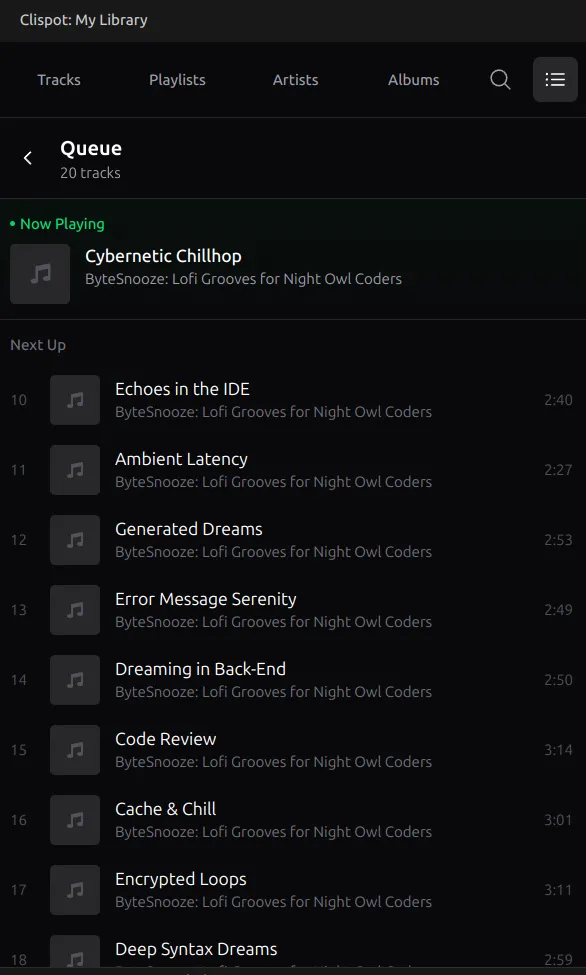
Queue Management
Section titled “Queue Management”Manage your music queue directly from the interface:
- Add to Queue: Hover over any track in a list and click the + (plus) icon to add it to your queue.
- Remove from Queue: In the Queue view, hover over a track and click the - (minus) icon to remove it.
Playback Control
Section titled “Playback Control”- Status Bar: Shows the currently playing track and time. Click to toggle play/pause.
- Commands: Open the Command Palette (
Ctrl+Shift+P) and typeClispotto see available commands:Clispot: Toggle Play/Pause: Pauses or resumes playback.Clispot: Refresh Library: Reloads your library data.
Troubleshooting
Section titled “Troubleshooting”- “Clispot is not installed”: Ensure the
clispotbinary is in your system PATH. - Server issues: The extension runs
clispot --headlessin a background terminal. If the extension fails to start the backend automatically, try runningclispot --headlessmanually in your terminal before using the extension. If issues persist, try restarting VS Code.